


Download iMyFone ScanOutlook – Free PST/OST Repair Tool for Windows & Mac
iMyFone ScanOutlook is a powerful and reliable data recovery software designed specifically for repairing corrupted or damaged Outlook PST and OST files. Whether you're dealing with the dreaded "PST file is corrupted" error or have accidentally deleted vital emails, contacts, calendars, or tasks, this tool helps you recover lost data quickly and securely. With its intuitive interface and advanced recovery algorithms, iMyFone ScanOutlook simplifies the complex process of Outlook file repair, making it accessible even for non-technical users.
The software supports multiple export formats including PST, EML, MSG, RTF, HTML, and PDF, ensuring compatibility with various email clients and backup systems. It also features a free PST/OST viewer that allows you to preview content before exporting—ideal for pinpointing specific messages or attachments. With automatic file detection, content search, and selective recovery options, iMyFone ScanOutlook stands out as a top-tier solution for Outlook users on Windows and Mac platforms.
Key Features of iMyFone ScanOutlook
One of the standout aspects of iMyFone ScanOutlook is its comprehensive set of features tailored for Outlook data recovery. First and foremost, the software specializes in repairing both PST (Personal Storage Table) and OST (Offline Storage Table) files—commonly used by Microsoft Outlook to store emails, contacts, calendars, tasks, notes, and journals. When these files become corrupted due to software crashes, power failures, or virus attacks, iMyFone ScanOutlook steps in with robust repair algorithms to restore your data with minimal loss. The tool supports multiple repair modes, including Quick Scan, Deep Scan, and Advanced Scan, allowing users to choose the most appropriate method based on the severity of corruption.
Another major advantage is the built-in free PST/OST viewer. This feature lets you preview emails, attachments, contacts, and calendar entries before committing to an export. This is especially helpful when you need to recover only specific data—such as a single email with an important attachment—without having to export the entire file.
The software also enables content-based searching using keywords like "Subject," "To," "Cc," or even the body text of messages, which drastically reduces recovery time. Furthermore, iMyFone ScanOutlook automatically detects default PST/OST file locations on your system, minimizing manual input and reducing user error. You can also manually browse and select files if needed.
With support for selective exporting, users can pick exactly which items to recover, saving time and storage space. The ability to export data into multiple formats—including PST, EML, MSG, RTF, HTML, and PDF—ensures maximum compatibility across platforms and devices.
How to Install and Use iMyFone ScanOutlook
Installing iMyFone ScanOutlook is a straightforward process, whether you're using Windows or Mac. Begin by visiting the official website and downloading the free version of the software. The installer is lightweight and runs smoothly on systems with minimal system requirements. Once downloaded, double-click the file and follow the on-screen prompts to complete the installation. No additional drivers or configurations are required, making it one of the most user-friendly tools in its category.
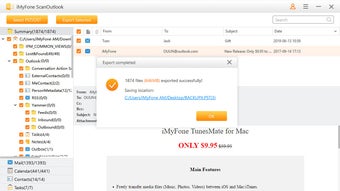
After installation, launch the application. The main interface is clean and well-organized, with clear navigation options. The first step is to select the corrupted PST or OST file you wish to repair.
If you're unsure of the file location, click the "Auto-Scan" button, and the software will automatically search your system for default Outlook data files. Alternatively, you can manually browse and locate the file using the file explorer. Once the file is selected, click "Start Repair" to initiate the scanning process.
Depending on the file size and corruption level, this may take several minutes.
Upon completion, the software displays a preview of all recoverable items. Use the search bar to filter results by subject, sender, date, or message content. You can then choose to export all data or select specific items for recovery.
Choose your preferred export format from the available options—PST, EML, MSG, RTF, HTML, or PDF—and specify the destination folder. The export process is fast and preserves the original folder structure, ensuring data integrity. For users who frequently deal with Outlook issues, the software also offers scheduled scans and automatic updates to keep the repair engine up to date.
Compatibility and System Requirements
iMyFone ScanOutlook is compatible with both Windows and Mac operating systems, making it a versatile choice for users across different platforms. On Windows, it supports Windows 10, Windows 11, Windows 8.1, and Windows 7 (64-bit recommended). For Mac users, it works seamlessly with macOS Big Sur, Monterey, Ventura, and Sonoma. The software is optimized for modern hardware and requires minimal system resources, so it won’t slow down your computer during the repair process.
Minimum system requirements include a 2 GHz processor, 2 GB of RAM, and at least 500 MB of free disk space. A stable internet connection is recommended for downloading updates and accessing the latest repair algorithms. The software is designed to work with Microsoft Outlook 2007 through Outlook 2024, ensuring broad compatibility across versions. Whether you're using Outlook on a personal laptop or a corporate workstation, iMyFone ScanOutlook integrates smoothly into your existing workflow.
For users who prefer mobile access, while the tool itself is desktop-based, the recovered data can be exported to formats like PDF or EML, which can be easily viewed on iOS and Android devices. This cross-platform flexibility enhances the overall usability of the software, especially for professionals who switch between desktop and mobile environments.
Pros and Cons of iMyFone ScanOutlook
- Pros:
- Efficient repair of corrupted PST and OST files
- Free PST/OST viewer with preview functionality
- Supports multiple export formats (PST, EML, MSG, RTF, HTML, PDF)
- Content-based search for quick data retrieval
- Automatic file detection and selective export options
- Available for both Windows and Mac platforms
- Simple 4-step recovery process suitable for beginners
- Regular updates and strong customer support
- Cons:
- Free version has limitations on export quantity
- Advanced features require a paid license
- Not available as a standalone mobile app
- Occasional lag with extremely large PST files
- Windows-only backup feature (Mac users need external tools)
Frequently Asked Questions (FAQ)
Final Verdict: Why You Should Download iMyFone ScanOutlook
For anyone relying on Microsoft Outlook for work or personal use, losing access to emails, contacts, or calendar data can be devastating. iMyFone ScanOutlook offers a reliable, secure, and user-friendly solution to recover lost or corrupted PST/OST files. Its combination of powerful repair technology, intuitive interface, and versatile export options makes it one of the best tools in its category. Whether you're a business professional managing critical communications or a student organizing assignments, this software provides peace of mind.
With a free version available for testing, there's no risk in trying it out. If you frequently encounter Outlook errors or have experienced data loss, upgrading to a 1-Year or Lifetime License unlocks full functionality and ensures long-term protection. Don’t wait until your next data crisis—download iMyFone ScanOutlook today and safeguard your digital life.







